How Do I Create a Book Index Automatically?
Creating a book index used to mean reading through page proofs by hand, identifying important topics, recording page numbers, organizing entries, and formatting the final index according to a publisher’s style requirements. For academic books, trade nonfiction, edited collections, memoirs, and scholarly monographs, that process can take days or weeks.
Today, it is possible to create a book index automatically with AI-assisted indexing software. The best systems do more than extract keywords. They read the manuscript, identify indexable concepts, build a structured list of entries and subentries, attach locators to the relevant pages, and give the author or editor a way to review the evidence behind each locator.
Automatic book indexing is especially useful when a book is already in final page proofs, when the index must follow Chicago-style conventions, or when a publisher needs a repeatable workflow for many books each year. The important point is that automatic indexing should produce a serious draft index, not merely a list of repeated words.
This guide explains how automatic book indexing works, what to watch out for, and how to create a usable back-of-book index without building the whole thing manually.
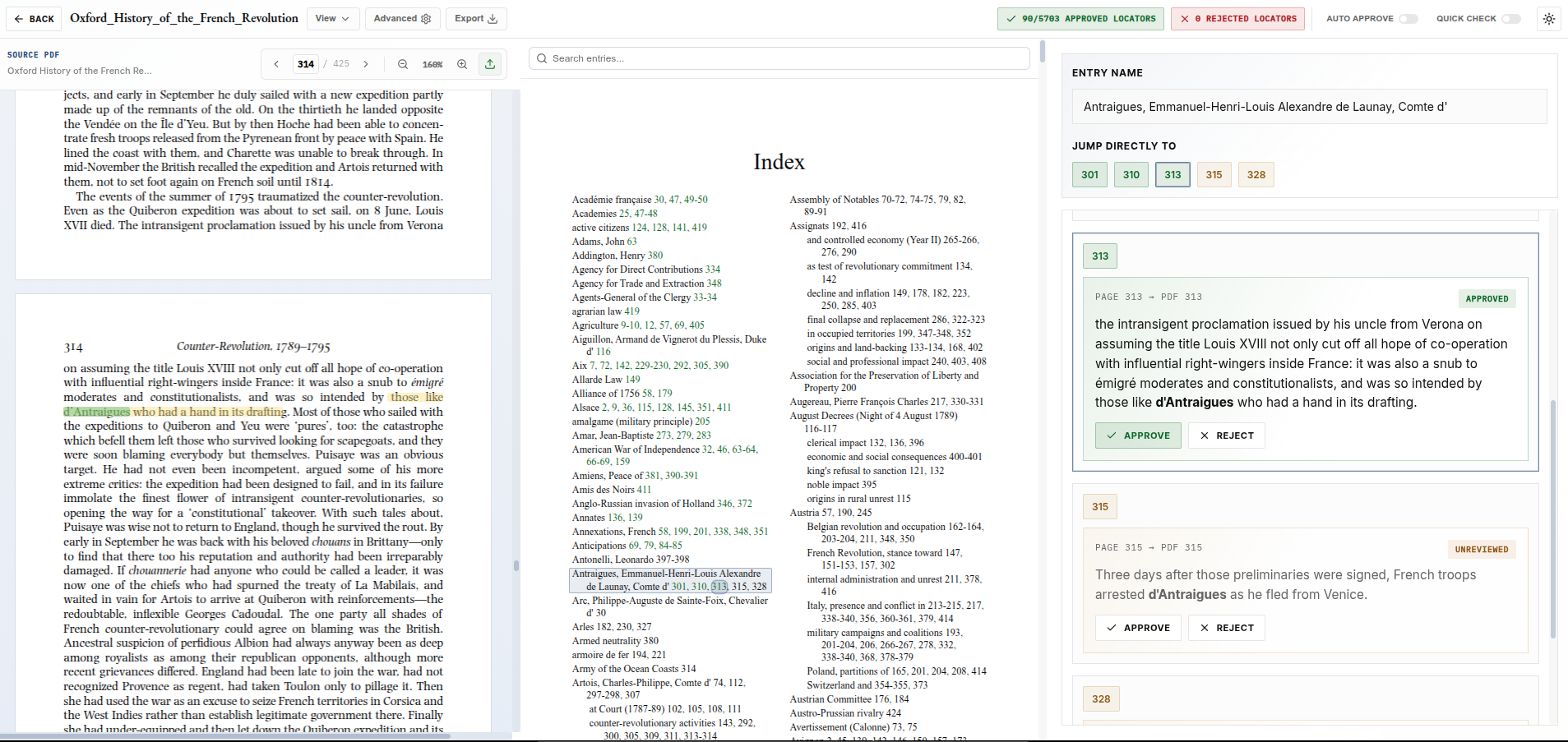
View a side-by-side comparison of a professional human index versus our AI-generated output for a 425-page scholarly volume.
View Oxford History Demo →Create your index with IndexerLabs.
Get StartedWhat does it mean to create a book index automatically?
To create a book index automatically means using software to generate the core structure of a back-of-book index from a manuscript, proof PDF, or Word document.
A strong automatic book indexing workflow usually includes several steps:
- Upload the book manuscript or page proofs
- Analyze the text for important people, concepts, places, works, events, and themes
- Generate candidate index entries
- Attach page locators to the passages where those entries are discussed
- Organize entries into a readable index structure
- Review the draft index with evidence for each locator
- Export the finished index in the required format
The result should look like a real book index: alphabetized entries, meaningful subentries where appropriate, page locators, and consistent formatting.
The goal is not to count word frequency. A book index is an editorial map of the book. It should help readers find substantial discussions, not every place a word appears.
Why keyword extraction is not enough
Many tools can extract keywords from a document. That does not mean they can create a good book index.
A keyword extractor might notice that a word appears often. But book indexing requires judgment. An indexer has to decide whether a topic is important enough to include, whether several related phrases should be merged under one heading, whether a passing mention deserves a locator, and whether a broad concept should be broken into subentries.
For example, a book might mention “schools,” “public education,” “educational reform,” and “classroom instruction.” A keyword tool may treat these as separate terms. A good index may need to organize them under a broader entry such as:
education
  classroom instruction
  public schools
  reform of
The same problem appears with names, titles, organizations, historical events, biblical references, legal cases, and technical terminology. Automatic indexing software should recognize when a term matters, how it should be phrased, and where it belongs in the final index.
This is the main difference between automatic keyword extraction and automatic book indexing.
Can ChatGPT create a book index automatically?
ChatGPT can help with parts of the indexing process, but it is usually a poor tool for creating a full publication-ready book index by itself.
There are several reasons.
First, a full-length book is too large to handle reliably in one prompt. Even when a model accepts long documents, it may lose detail, flatten the book’s structure, or miss important local discussions. A human indexer does not create an index by reading a whole book in one pass and then remembering every relevant page from memory. A useful indexing system needs checkpoints, local evidence, revision, and verification.
Second, ChatGPT does not naturally know the final pagination of a book unless the text is tied to page proofs. A book index depends on exact locators. If the model is working from pasted text, EPUB text, or unpaginated manuscript text, the page numbers may be missing or unreliable.
Third, generic chatbots tend to over-index some terms and under-index others. They may include entries that sound important but are only mentioned briefly, while missing recurring themes that are expressed in varied language across chapters.
ChatGPT can be useful for brainstorming possible index entries, cleaning up wording, or reviewing a small section. For a full book, a specialized automatic book indexing workflow is much more reliable.
The best way to create a book index automatically
The most practical workflow is to use an AI book indexing tool designed specifically for back-of-book indexes.
A good automatic indexing system should handle three separate tasks:
1. Deciding what belongs in the index
The system should identify meaningful topics, not just repeated strings. This includes people, places, institutions, ideas, events, works, terminology, and recurring arguments.
For scholarly books, this step is especially important. Academic readers use indexes to find arguments, not just vocabulary. A good index should include the concepts that organize the book.
2. Finding the right locators
After the system decides what to index, it must find the pages where each entry is actually discussed. This is where many automatic tools fail. A word may appear on a page without the page being useful to a reader.
For example, if a person is listed in a footnote bibliography, that may not justify an index locator. But if the book discusses that person’s argument for several paragraphs, the locator is useful.
The best automatic systems provide evidence for each locator, so the editor can see why a page was included.
3. Producing a reviewable, editable index
Automatic indexing should not be a black box. The system should produce a draft that can be reviewed, corrected, merged, deleted, and exported.
For professional use, this review step matters. Even a very strong automatic index may need adjustments for house style, wording, subentry structure, cross-references, or publisher-specific requirements.
Step-by-step: how to create a book index automatically
Step 1: Start with final page proofs when possible
The best time to create a book index is after pagination is stable. If your book is still changing, page numbers may shift. That creates extra cleanup work later.
For most academic and nonfiction books, indexing happens from final or near-final proofs. A PDF proof is often enough. If you need an embedded Word index, a DOCX file may be preferable.
Use the most final version you have.
Step 2: Upload the manuscript or proof file
An automatic indexing tool will usually ask you to upload a PDF, DOCX, or other manuscript file. The tool then reads the book and divides it into sections that can be analyzed.
For a high-quality index, the tool should preserve page boundaries. This lets it attach locators to the correct pages rather than guessing.
Step 3: Generate candidate index entries
The system then identifies possible top-level entries. These may include:
- people
- places
- organizations
- books and articles
- historical events
- concepts and themes
- technical terms
- laws, cases, or policies
- scripture references, where relevant
- recurring arguments or topics
This step should be generous at first. It is usually better for an automatic system to notice too many plausible entries than to miss central topics. The draft can then be pruned, merged, and refined.
Step 4: Build the locator map
Once the system has a list of entries, it searches the book for meaningful discussions of each entry. A serious automatic indexing system should distinguish between substantial discussion and passing mention.
This is where locator evidence becomes important. If an entry says:
literacy, 34, 78-79, 112
the reviewer should be able to inspect the relevant passages on pages 34, 78-79, and 112. Without evidence, it is difficult to know whether the locator is accurate.
Step 5: Review and edit the draft
Automatic indexing is strongest when paired with a focused review pass. The reviewer should look for:
- duplicate entries
- awkward phrasing
- overly broad entries
- missing subentries
- passing mentions that should be removed
- important topics that were missed
- names that should be inverted
- inconsistent capitalization
- publisher style requirements
This is much faster than creating the whole index by hand. The software produces the draft structure and locator evidence, while the author or editor makes final judgment calls.
Step 6: Export the index
After review, the index can be exported in the format required by the publisher.
Common formats include:
- plain text
- Word document
- formatted DOCX
- embedded Word index with XE fields
- PDF preview
- publisher-specific formatting
For Word-based production workflows, embedded indexing is especially useful. Instead of pasting a static list of page numbers, the index entries can be embedded into the Word file so that Word generates the final page numbers. This reduces the risk of page-number mismatch when formatting changes.
How long does automatic book indexing take?
Automatic book indexing can produce a draft much faster than traditional manual indexing. For a typical nonfiction or academic book, the automated generation step may take hours rather than days.
The exact timing depends on:
- book length
- file format
- number of pages
- density of names and concepts
- whether endnotes are included
- how much editorial review is needed
- whether the index needs embedded Word output
A realistic goal is not merely speed. The aim is to produce a draft that is accurate enough to review efficiently. A fast index that cannot be trusted is not useful. A slower but evidence-backed automatic index is much more valuable.
What makes an automatically generated index good?
A good automatically generated book index should have the same qualities as a good human index.
It should be selective. It should include the topics readers are likely to search for. It should avoid cluttering the index with every passing mention.
It should be structured. Broad entries should be broken into subentries when that helps the reader. Related terms should be merged where appropriate. Names should be formatted consistently.
It should be accurate. Locators should point to real discussions. Page ranges should make sense. The reviewer should be able to verify why each locator appears.
It should be readable. A book index is not a database dump. It is a navigational tool for readers.
The strongest automatic indexing systems combine AI judgment with deterministic verification, page-aware locator extraction, and human review.
Should an automatically generated index still be reviewed?
Yes. For a serious book, the automatic index should be reviewed before publication.
That does not mean the process has failed. It means the software is doing the heavy first pass, while the author, editor, or indexer handles the final editorial decisions.
This is similar to copyediting, typesetting, or citation management. Software can automate a large amount of work, but publication-quality output still benefits from review.
The review pass is where you can adjust tone, merge entries, remove unnecessary locators, check edge cases, and make sure the index fits the book’s audience.
Can I automatically create a Chicago-style book index?
Yes, an automatic indexing system can help produce a Chicago-style book index, especially if it is designed for scholarly and nonfiction books.
Chicago-style indexing usually requires attention to:
- alphabetization
- capitalization
- name inversion
- subentry formatting
- page ranges
- treatment of notes
- treatment of illustrations, tables, and figures
- treatment of passing mentions
- cross-reference conventions
For academic publishers, the index may also need to include substantive endnotes while excluding acknowledgments, bibliographies, or other sections depending on the press’s instructions.
An automatic system should let you configure or review these choices rather than assuming one universal format.
The easiest way to create a book index automatically
The easiest way to create a book index automatically is to use a specialized AI book indexing tool.
With IndexerLabs, the workflow is simple:
- Upload your book manuscript or page proofs.
- Generate a draft back-of-book index.
- Review entries and locator evidence.
- Edit, approve, or remove entries.
- Export the finished index in the format you need.
IndexerLabs is designed for publication-ready book indexes, not generic keyword extraction. It can generate structured subject indexes, provide evidence for locators, and support workflows such as embedded Word indexing for DOCX files.
For authors and publishers, this means the index can be created much faster while still remaining inspectable and editable.
Automatic book indexing vs hiring a human indexer
Hiring a professional human indexer is still a strong option, especially for complex books, highly specialized subjects, or presses with established indexing workflows.
Automatic indexing is most useful when:
- the deadline is tight
- the budget is limited
- the book needs a strong first draft quickly
- the publisher has many books to process
- the author wants more control over review
- the index needs locator evidence
- the workflow needs to be repeatable
The best comparison is not “AI versus human judgment.” The more useful question is how much of the mechanical and repetitive work can be automated while preserving the editorial judgment that makes an index valuable.
For many books, automatic indexing can produce a near-complete draft, after which a reviewer can spend time on quality rather than starting from a blank page.
Final thoughts
You can create a book index automatically, but the quality depends heavily on the tool and workflow you use.
A simple keyword extractor will not produce a serious back-of-book index. A generic chatbot may help with small sections but will struggle with full-book structure, page locators, consistency, and verification. A specialized AI indexing system can produce a much more useful draft by combining document analysis, index-entry generation, locator extraction, and review tools.
For authors, this means a book index no longer has to be an expensive last-minute bottleneck. For publishers, it means indexing can become a repeatable production workflow rather than a manual scramble at the end of the schedule. For more budget context, see our guide to book indexing cost.
The best automatic book index is still one that can be inspected, edited, and trusted. That is the difference between generating a list of terms and creating a real index for readers.
Create your index with IndexerLabs.
Get Started